AdsCook is a specialized Facebook and Instagram ads automation platform designed to help advertisers create, automate, and analyze campaigns more efficiently. Unlike Facebook’s native Ads Manager, which can be cumbersome for large-scale work, AdsCook positions itself as a powerful yet user-friendly alternative.
It bridges the gap between simplistic tools that lack advanced features and enterprise-level solutions that are overly complex and expensive. In essence, AdsCook offers advanced Facebook/Instagram campaign management with a simple interface and lower pricing than big-enterprise tools.
In this review, we’ll delve deep into AdsCook’s capabilities, target use cases, and real-world performance. We’ll also compare it with popular competitors like Revealbot, Madgicx, and AdEspresso. By the end, you’ll have a clear picture of when AdsCook is the right choice for your pay-per-click (PPC) advertising needs and how to get the most value from it.
Target Use Cases for AdsCook

Who benefits most from AdsCook? The platform is versatile, but it’s particularly well-suited for several types of users and organizations:
- E-commerce Businesses: Online retailers running large-scale Facebook/Instagram campaigns can save immense time. AdsCook shines when launching hundreds of product ad variations and creative tests each month. Features like dynamic creative generation (simply upload a product image and generate many ad variants) and funnel analytics help e-commerce advertisers optimize for purchases and ROI.
- Agencies and Marketing Teams: Agencies managing multiple client ad accounts will appreciate AdsCook’s multi-account dashboard and team-friendly tools. It enables an agency team to handle more clients with fewer resources by automating routine tasks. With support for connecting numerous Facebook ad accounts (no hard limit) and multiple user profiles, teams can collaborate on campaigns in one interface. Agencies also benefit from cross-account reporting and the ability to clone or bulk edit campaigns for different clients.
- SaaS and B2B Marketers: For SaaS companies and B2B advertisers focused on lead generation, AdsCook provides funnel step analysis and leads synchronization features. The platform’s real-time funnel analysis widget helps pinpoint weak points (e.g. sign-up, add-to-cart, etc.) in the conversion funnel to improve ROI. While AdsCook currently only manages Facebook/Instagram ads, it can integrate with tools like Google Analytics and perhaps e-commerce platforms (as discussed later) to give SaaS marketers a fuller picture of ad performance.
- Small Businesses & Solopreneurs: Even individual advertisers or small businesses can leverage AdsCook to “add media buying power to their team” without hiring extra staff. Solopreneurs juggling many tasks benefit from automation rules that manage campaigns 24/7 and from the intuitive interface that shortens the learning curve. AdsCook’s affordable entry pricing (pay-as-you-grow) and no-code rule presets make it accessible to smaller advertisers who want to scale efficiently.
In short, any business heavily using Facebook/Instagram ads and seeking greater efficiency is a potential fit for AdsCook. Whether you’re a one-person shop needing smart automation or an agency managing dozens of accounts, AdsCook aims to save time and improve results. Next, we’ll explore exactly how it does that through a deep feature analysis.
Deep Feature Analysis of AdsCook
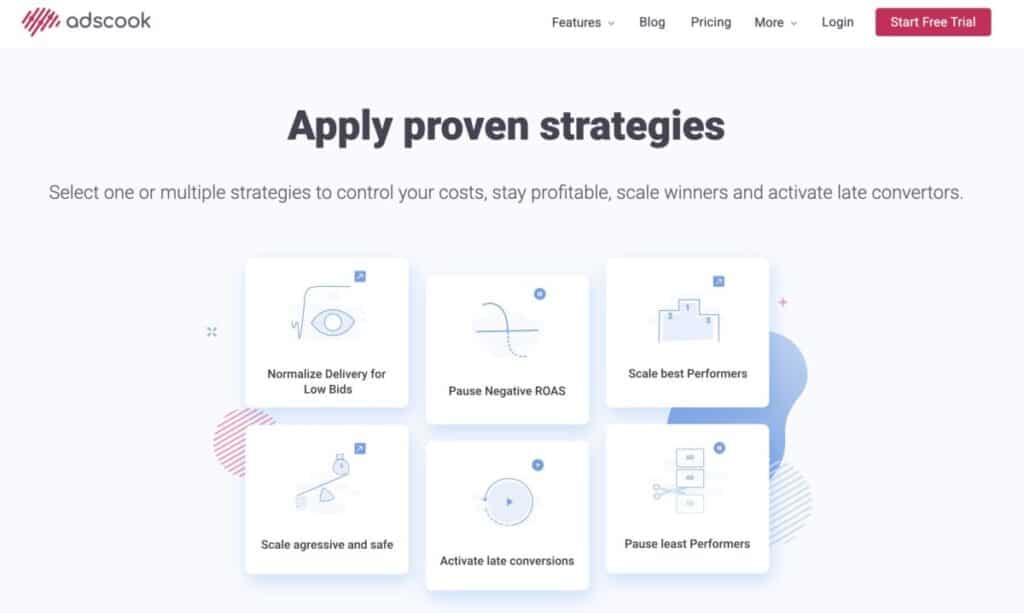
AdsCook is packed with features that streamline the lifecycle of Facebook and Instagram advertising. We’ll break down its capabilities in detail:
Campaign Automation and Performance-Based Rules
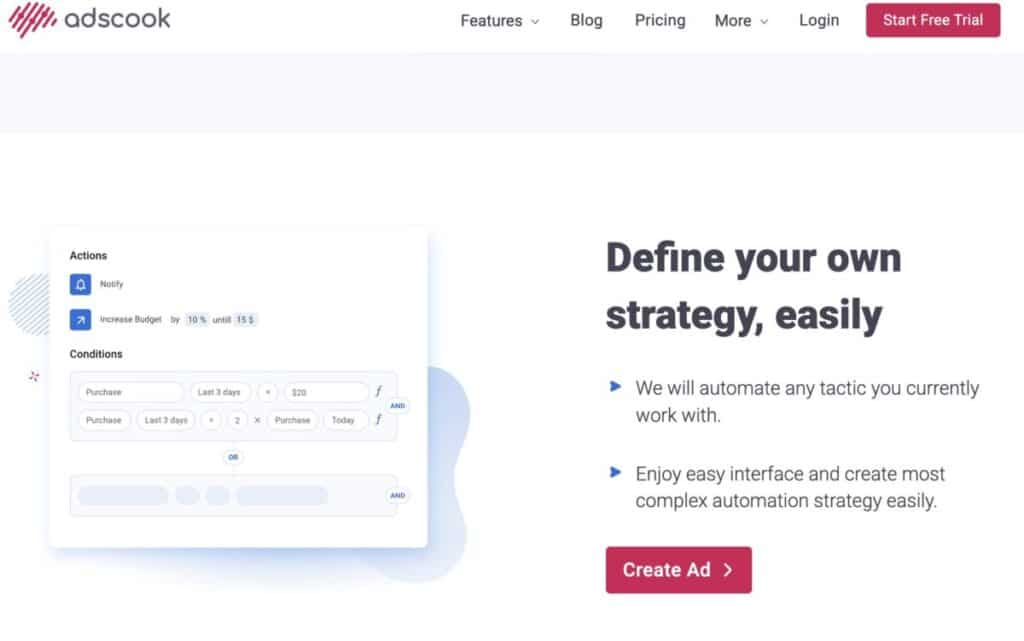
One of AdsCook’s flagship features is its Automation Rules engine for campaigns, ad sets, and ads. This goes far beyond Facebook’s native automated rules in power and flexibility. AdsCook allows you to automate virtually any action (pausing ads, adjusting budgets, duplicating winners, etc.) based on performance metrics and conditions you define.
Some highlights of AdsCook’s automation & rule system include:
- Complex Rule Conditions: AdsCook supports combining conditions with AND/OR logic and nesting, which Facebook’s native tool does not (Facebook only allows all conditions joined by AND). For example, you can create a single rule that says: IF (Spend > $50 AND Purchases = 0) OR (Spend > $50 AND ROAS < 1) THEN pause the ad set. Natively, that would require two separate rules, but AdsCook handles it in one rule with grouped OR conditions.
- Dynamic Metric Comparisons: AdsCook introduces dynamic conditions to act on trends. You can compare a metric against its value in a previous time period. For example, pause an ad if ROAS this month is less than ROAS in the last 30 days, to catch performance declines. This feature automates what advertisers manually do to observe trends week-over-week.
- Relative Performance Triggers (Ranking): Unlike Facebook rules, AdsCook lets you set conditions based on relative performance across a group. You can rank your campaigns/ad sets by a metric and take action on the top or bottom performers. For instance, automatically increase budget on the top 20% of ad sets by ROAS, or pause the bottom 10% performers. This is a powerful way to continuously optimize and scale – the best performers get boosted and poor performers get culled, without manual monitoring.
- Wide Range of Actions: AdsCook’s rule actions cover all the essentials and more: pause/resume, adjust budgets (increase/decrease or set to an exact value), duplicate ads/ad sets (for scaling winners), adjust bids, add labels to names, and even delete underperformers in bulk. For example, you could set a rule to automatically duplicate an ad set that’s achieved a cost per acquisition below $5 and increase its budget by 20% – a hands-free way to scale good ads.
- Custom Schedules & Frequency: You control how often rules check and execute. AdsCook allows frequencies as often as every 15 minutes or as sparse as once every 72 hours, plus custom day/time schedules. By contrast, Facebook only offers continuous (roughly 30-min) or once-daily checks. Finer control means you can, for example, run aggressive checks during business hours for fast-paced campaigns, or limit rule executions overnight.
- Notifications and Team Alerts: When a rule triggers, AdsCook can send real-time alerts via email or Slack. This is great for team collaboration – e.g., your team’s Slack channel gets a message whenever an ad is paused by a rule, so everyone stays in the loop on changes made by the automation.
Example of AdsCook’s Automation Rule builder: setting an auto-scale rule with complex conditions (including OR logic, relative performance like “Top%”) to increase budget when ROAS is high. AdsCook’s interface supports nested conditions and dynamic comparisons for truly custom automations.
Overall, AdsCook’s automation features serve as a virtual assistant, monitoring your campaigns 24/7 and taking predefined actions to maximize results. This keeps your account profitable even when you’re not actively watching it. Users often praise this aspect – for example, one reviewer noted that AdsCook “increased ROI with smart automation rules” and gave them complete control over spend even outside work hours. It’s an ideal solution for busy advertisers who can’t babysit campaigns constantly.
A/B Testing and Ad Variations at Scale
Another core strength of AdsCook is simplifying the creation of many ad variations for testing. Split testing is crucial for optimizing ads, and AdsCook makes it both easier and more powerful:
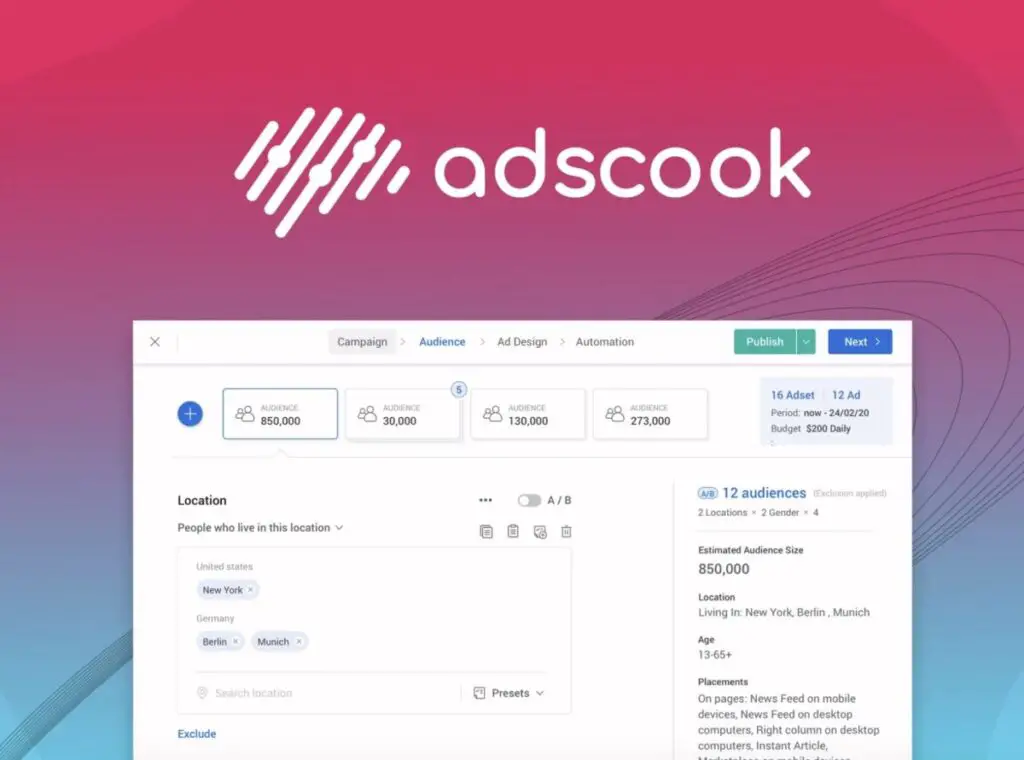
- Multivariate Ad Creation: AdsCook’s campaign creation wizard allows you to turn on an “A/B test” toggle for multiple elements – audiences, creatives, placements, etc. – and then it automatically generates all combinations of those variants. For example, if you want to test 4 audience segments × 5 ad images × 2 ad copy texts, AdsCook can spin out 4×5×2 = 40 ad variations in minutes. Doing this manually in Facebook Ads Manager would be extremely time-consuming. AdsCook essentially enables multivariate testing to find the best combination of targeting and creative faster.
- Grouped Variable Testing: You can group related values to test high-level concepts. AdsCook introduced a “Group and A/B Test” feature to let you test sets of values together. For example, group several similar interest keywords into one audience variant vs. another group of interests. This way you test themes (e.g., “smartwatch fans” vs “traditional watch fans”) rather than single interests, which is a more efficient use of budget and yields broader insights. Facebook’s native A/B testing doesn’t support such grouping easily.
- Unlimited Combinations & Variables: There isn’t a hard cap on how many variables you can test simultaneously. If you have the budget, AdsCook lets you include multiple parameters. It’s up to the advertiser to decide one-at-a-time tests vs multivariate – AdsCook supports both approaches. As their blog notes, you should balance granularity with budget, but the tool will handle whatever you throw at it.
- Preserving Social Proof: When creating variants, AdsCook can leverage existing Page posts to maintain engagement metrics (likes, comments) across your tests. For example, it allows using existing posts for ads or cloning past ads so you don’t lose the social proof on an ad when testing it in new campaigns. This is great for performance because each variant can start with some credibility (social proof) rather than zero.
- Quick Copy & Paste Setup: AdsCook streamlines a lot of the tedious data entry in ad creation. You can copy-paste targeting settings from one ad set to another. Also, commonly used presets (like saved age ranges or location sets) can be loaded with one click. The interface was clearly built to minimize repetitive manual input, which speeds up launching tests.
AdsCook’s A/B testing interface in the campaign setup: Here we see an audience configuration with multiple locations and age brackets toggled for “A/B”. The tool indicates that 4 locations × 3 age groups = 12 audience combinations will be created automatically. This makes it easy to test different demographic segments without creating each ad set by hand.
AdsCook essentially makes Facebook Ads A/B testing “almost fun,” as their website proclaims. By automating variant generation, it encourages advertisers to test more and learn faster. As one user review noted, “I especially like the A/B testing feature – it is easy to create powerful, automated FB ad campaigns…with Adscook it is almost fun!”. Proper experimentation leads to better ads and lower costs, and AdsCook removes the barriers to running those experiments.
Asset Library and Creative Management
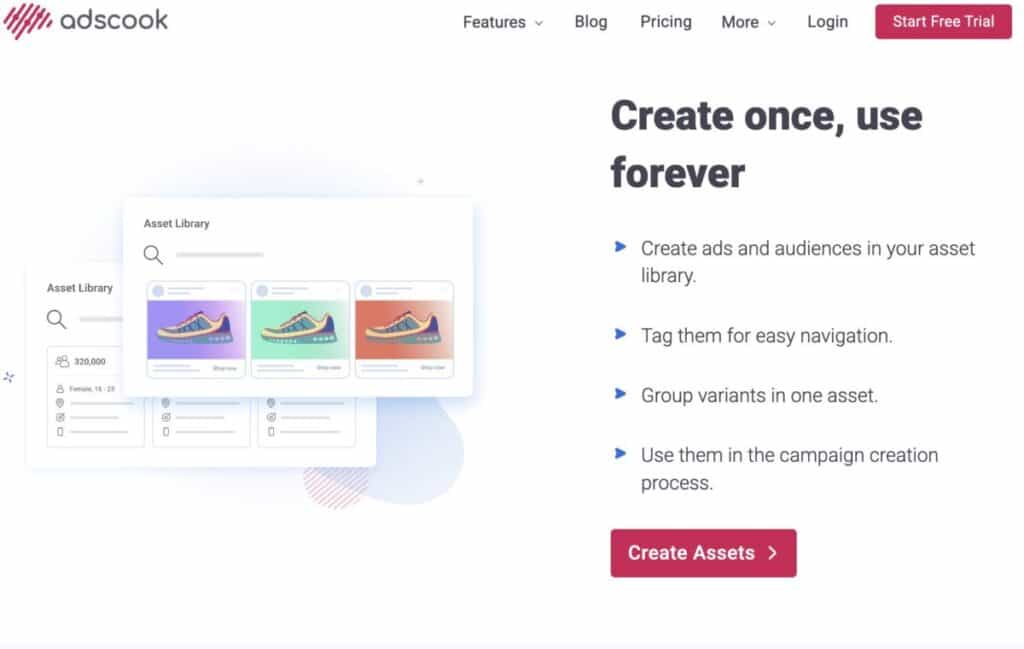
For advertisers running many campaigns, organizing your assets (audiences, images, ad copy, etc.) is critical. AdsCook addresses this with a robust Asset Library and preset system:
- Saved Audiences and Ads: In AdsCook you can save any audience or ad creative you create, and easily reuse them across campaigns. If you often target the same demographic or always use a set of 3 ad copy versions, you don’t need to rebuild them each time. This library prevents errors and saves time in campaign setup.
- Categorized Tagging: AdsCook allows you to tag assets with multiple custom tags for easy filtering. For example, an audience could be tagged “TOF” (top-of-funnel) and “UK” and “Fashion Bags”, and an image creative might be tagged “Lifestyle” and “HolidayPromo”. The tool will autosuggest existing tags to keep naming consistent. Later, you can quickly pull up all “TOF” audiences or all “HolidayPromo” creatives with a simple filter. This is extremely helpful for team collaboration, ensuring everyone uses and finds the right assets.
- Grouped Assets (Variants): You can save a group of variants as one asset entry. For instance, if you always test 3 headlines together as a set, save them as a group. Then in a new campaign, adding that group will insert all 3 ads automatically. The UI even shows a badge with the number of variants in a group. This feature supports consistent multivariate testing without re-uploading each variation.
- Field Presets: AdsCook lets you save frequently used values for fields like locations, interests, age ranges, etc. as presets. For example, you might save a preset of top-performing U.S. cities or a preset of certain interest keywords. You can then apply that preset into any new audience with one click. This micro-automation reduces the chance of omissions and speeds up building audiences. You can also copy an entire field’s values from one asset to another.
- Centralized Asset Hub: All of these saved components are accessible within the campaign creation workflow. AdsCook brings the library into your campaign builder, so you’re not jumping between different tools or relying on spreadsheets to store audiences. This integrated approach is far more efficient than using Facebook’s separate Audience Manager, Creative Hub, etc., which “are not so useful” when working in a team context.
- Media and Creative Tools: You can upload images/videos from your computer or even directly from Google Drive into AdsCook, then save them in the library for reuse. It supports all Facebook ad creative types (carousel, video, static, etc.). AdsCook also has an AI copy generator according to one source (likely to suggest ad text variations), though we didn’t test that feature in depth.
By keeping assets organized, AdsCook ensures that launching a new campaign – even with hundreds of ads – can be done in minutes without hunting for past creatives or redoing work. This is a major productivity boost, especially “when you work in a team” and need consistent processes. Without an asset library, advertisers often rely on memory or scattered documents, which is error-prone. AdsCook’s solution keeps your Facebook marketing structured and scalable.
Reporting and Dashboard UX
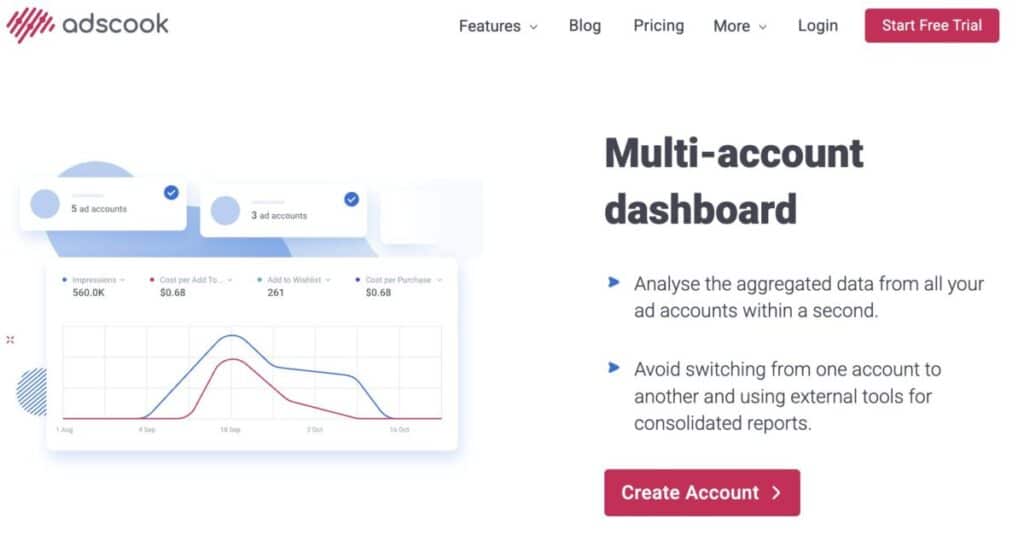
AdsCook provides a unified dashboard that aggregates data across all your connected ad accounts, giving you real-time insights into performance. The reporting and user experience deserve special mention:
- Multi-Account Dashboard: If you manage multiple Facebook ad accounts (for different clients or brands), AdsCook lets you monitor all of them in one place. You can visualize cross-account metrics without logging in and out of different Business Managers. This is a boon for agencies – an overview of total spend, ROAS, clicks, etc., across accounts on a single screen.
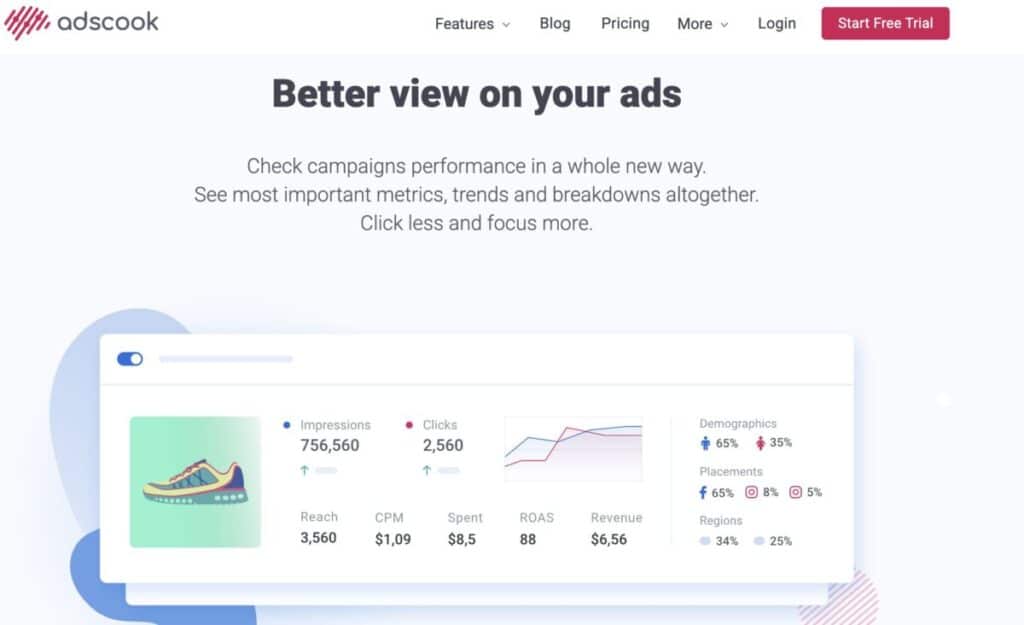
- Customizable Reporting Views: The dashboard is customizable to focus on your key performance indicators (KPIs). It displays essential metrics like ROAS, clicks, spend, CPA, etc., in a clean visual layout with trendlines over time and percentage changes. You can filter and segment data by campaigns, tags, date ranges, and more (there are filter tools and presets available).
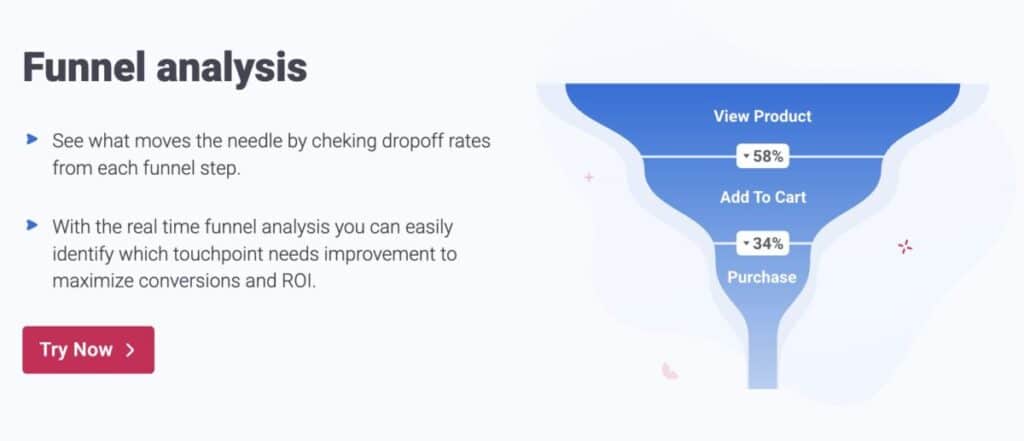
- Funnel Analysis Widget: A unique feature is the ability to define and visualize your own conversion funnel in the dashboard. For example, an e-commerce advertiser can map funnel steps (View Content → Add to Cart → Purchase) and AdsCook will display a funnel chart showing the conversion rates or drop-off at each step. The screenshot below shows an example funnel with percentages at each stage. This makes it easy to spot where in the customer journey you’re losing people (e.g. lots of product views but low adds-to-cart indicates a problem at that step). Funnel reporting is crucial for optimization and not something Facebook provides natively in a straightforward way.
- Inline Edits and Management: The dashboard isn’t just read-only; it allows you to take action. You can edit assets or pause campaigns right from the dashboard view. For instance, if you notice an ad’s CTR dropping, you could swap the creative or adjust the budget on the spot without navigating deep into menus.
- Visual and User-Friendly Design: AdsCook’s interface is modern, uncluttered, and designed for ease of use. Multiple user reviews highlight how “super easy to use” the platform is. Important data is visualized with charts and color-coded trends (green for improvement, red for decline), which makes it accessible even to those who aren’t data experts. The left navigation (Dashboard, Audience, Ad Assets, Automation) is straightforward. Overall, the UX lowers the learning curve relative to more complex tools. One competitor’s blog even noted that AdsCook’s interface can feel a bit complex for absolute beginners, but for intermediate marketers it’s quite intuitive.
AdsCook’s unified dashboard view, showing key metrics and trends for an account. In this example, ROAS is 3.24 (up +34.5%), and CTR is also up +23.5%, indicating improved performance. The funnel on the right illustrates drop-off at each stage (e.g., a -58% from View Product to Add to Cart). The dashboard also lists campaigns with their individual impressions, spend, ROAS, CTR, etc., and top demographics/regions. This clean UI makes it easy to monitor and analyze campaign results without exporting data to another tool.
- Collaboration and Reports: AdsCook supports scheduled email or Slack reports (e.g., a weekly summary to your team or client). While not as elaborate as some dedicated reporting tools, it covers the basics. If needed, you can always export data for further analysis, but many users find the built-in dashboard sufficient for day-to-day decision-making. Notably, AdsCook does not currently provide a white-label PDF report builder like AdEspresso does, but it focuses on live dashboards instead.
In summary, AdsCook’s reporting interface consolidates everything a PPC manager needs to gauge performance and act on it quickly. The combination of cross-account views, funnel analysis, and easy-to-read charts provides a holistic understanding of your Facebook ad efforts – all within AdsCook’s platform. This can eliminate the need for a separate reporting tool in your workflow.
Scaling and Optimization Tools
Scaling Facebook campaigns while maintaining efficiency is a delicate task. AdsCook includes features geared towards scaling up what works and scaling back what doesn’t:
- Automated Budget Scaling: Using the automation rules discussed, you can implement safe scaling strategies. For example, set rules to increase budget by 20% every day an ad set’s ROAS stays above 3, up to a maximum budget cap. This ensures you capitalize on winning ads quickly (no waiting for manual checks) without overshooting budgets. Conversely, rules can reduce or stop spend on poor performers (e.g., if CPA rises above your target, cut budget by 30%). This dynamic budget allocation is key to scaling profitably and is done hands-free.
- Auto-Duplicate and Expand: AdsCook’s rule actions include “Duplicate” which can automatically clone your best ad or ad set when a condition is met. A common scaling tactic is duplicating a high-performing ad set into a new campaign (perhaps with a higher budget or a different lookalike audience). AdsCook can handle that at any hour. For instance, if an ad set exceeds a 5:1 ROAS, you might duplicate it and apply a 1-day lookback window or a fresh budget – AdsCook can do this instantly via automation.
- Finding New Audiences: AdsCook can help identify optimal lookalike audiences via rules (e.g., automatically test the next percentage increment of a lookalike when the current one is performing). It’s not an AI that finds audiences for you, but by automating tests and monitoring results, it facilitates a systematic expansion into new targeting segments. Also, the integration with Shopify or WooCommerce (discussed in Integrations below) could potentially feed in product or audience data for advanced retargeting, though specifics on that integration are limited.
- Performance Alerts: The Slack/email alerts on rule triggers effectively notify you when scale actions happen. So if AdsCook doubled the budget on Campaign A at 3 PM due to a sales surge, you’ll know immediately. This transparency gives confidence to let the automation run – you’re never in the dark about big changes.
- Maintaining Efficiency: Scaling is not just increasing budgets – it’s also about maintaining efficiency as spend grows. AdsCook’s real-time analytics and rule capabilities help maintain your desired KPI thresholds. For example, you could have a rule: If cost per purchase this week is 20% higher than last week, decrease budget by 10% (using dynamic comparisons). This kind of self-correcting mechanism prevents overspending when results start to dip, essentially enforcing “efficiency floors” during scale.
Many advertisers struggle with performance dropping when they scale budgets. AdsCook addresses this by reacting quickly to metric changes and by allowing very granular control. One reviewer mentioned using AdsCook specifically to manage “momentum bidding” – catching those times when an ad is hot and pushing it, or pulling back when it cools off. The tool’s ability to check every 15 minutes means you can ride the momentum of an ad (scaling it up at the right moments) better than a human could manually.
Team Collaboration and Workflow Tools
While AdsCook is not a full-blown team project management system, it does incorporate features that help teams work together on ad campaigns:
- Multi-User Access: You can connect multiple Facebook user profiles to an AdsCook account. This means different team members (with their own Facebook login) can all work within the same AdsCook workspace. AdsCook will use the highest permission level among connected profiles for each ad account. For example, if two team members connect and both have access to Client X’s ad account, AdsCook takes the permissions of the last connected profile. This is a bit quirky (perhaps not true role-based accounts internally), but it enables a form of multi-user collaboration. Essentially, agencies can have several employees managing campaigns concurrently in AdsCook.
- Shared Asset Library: As discussed, the asset library with tagging is extremely beneficial for teams. Everyone on the team can use the same saved audiences and creatives, which enforces consistency. No more “Bob used the wrong version of the audience” – the canonical audiences are in AdsCook for all to select. This reduces mistakes when multiple people are creating campaigns.
- Notifications & Logs: Every automated rule action or change can be communicated (via Slack/email), which keeps team members informed. AdsCook also likely has an activity log (common in such tools) so you can see who created or edited a campaign. Being able to trace changes is important in multi-user scenarios, though we don’t have a UI screenshot of the log.
- Collaboration via Slack: The integration with Slack means a team can set up a shared Slack channel for AdsCook alerts. For example, the team gets notified “Rule X paused Ad Y due to low ROAS” – then a team member can follow up by adjusting creative, etc. It creates a proactive workflow where the tool flags issues and the team can respond.
- Client Collaboration: If you are an agency, you could invite clients to connect their Facebook profile to AdsCook to grant access, or generate reports for them directly from AdsCook. There’s also a “Request a Demo” and presumably the ability to have separate workspaces or sub-accounts under your agency (though this isn’t explicitly clear, some tools offer sub-accounts for clients). AdsCook’s FAQ mentions sub-accounts in context of connecting profiles, but not a structured role system. Competitors like AdEspresso do have sub-account features for agencies (e.g., multiple subaccounts allowed on higher plans). AdsCook likely handles it by you just connecting all needed ad accounts and using tags or naming conventions to separate client campaigns (plus you could tag assets by client name for organization).
- Onboarding and Ease of Use: From a workflow perspective, AdsCook tries to make onboarding simple. To start, you just connect your Facebook profile and it automatically syncs all your ad accounts. Thereafter, managing existing campaigns or creating new ones is seamless within AdsCook. This one-time setup means your team doesn’t have to individually pull reports or manage each account in native UI – AdsCook becomes the central hub.
One thing to note is that AdsCook currently supports only Facebook and Instagram for ad management (they operate via the Meta Ads API). If your team also runs Google, LinkedIn, etc., you’d be using separate tools for those. Some competitors are cross-platform; AdsCook has chosen to specialize in Meta for now. If your workflow involves multiple ad channels, AdsCook will cover the Meta side excellently, but you’ll have to integrate its output with reports or routines for other channels separately.
Overall, AdsCook provides enough collaboration features for small to mid-sized teams to work efficiently. It may not have the advanced role-based permissions of some enterprise tools (e.g., no granular roles like “Analyst” vs “Operator” within AdsCook aside from Facebook’s own account permissions), but it covers the bases for internal teamwork on Facebook advertising.
User Experience and Workflow
Beyond features, it’s important to consider how AdsCook feels to use day-to-day. Here we evaluate the user experience from onboarding to integrations to ongoing campaign management:
- Onboarding and Setup: Getting started with AdsCook is straightforward. You sign up for an account and then connect your Facebook profile (using Facebook Login OAuth). AdsCook will then import all ad accounts you have access to. There’s no complex configuration – if your Business Manager and pixel are already set up in Facebook (prerequisites), AdsCook plugs right in. This process only takes a few minutes. The no credit card 7-day free trial allows you to test the platform without commitment. For users who need help, AdsCook offers a demo request and has FAQs on common setup hiccups (e.g., domain verification issues after iOS14, which they address in their FAQ).
- Integrations (Meta, Shopify, WooCommerce, GA): AdsCook’s primary integration is obviously with Meta (Facebook/Instagram). It’s a certified Facebook Marketing Partner app, so it uses Facebook’s API in a compliant way (AdsCook mentions using whitelisted IPs to make requests to Meta’s API reliably). In addition, AdsCook integrates with Google Analytics for enhanced tracking and condition triggers. This means you can include GA metrics in your AdsCook dashboard/rules, and likely track post-click conversions better. For e-commerce, AdsCook “integrates mainly with e-commerce platforms like Shopify”. While details are sparse, this suggests you can connect your Shopify or WooCommerce store data. Possibly this is used to import conversion events or revenue data directly, improving rule accuracy (e.g., using actual Shopify revenue for ROAS calculations, or syncing product feeds). It may also facilitate creating custom audiences from Shopify customer data or syncing leads. MyDataNinja (a competitor) notes that unlike their product which connects to many platforms, AdsCook’s integrations are mainly e-com focused (Shopify, etc.). So, if you run a Shopify or WooCommerce store, AdsCook likely has plugins or API connections that make it easier to track purchases and perhaps manage catalogs for Dynamic Product Ads. We do not have evidence of AdsCook managing Google or TikTok ads (it doesn’t; it sticks to Meta). So integration scope is narrower than some cross-channel tools, but deep enough for the Facebook ecosystem.
- Ad Creation Process: Using AdsCook’s campaign wizard is intuitive. It follows a logical flow: Campaign settings (objective, budget type) → Audience → Ad Design → Automation (optional rules). At each step, AdsCook provides a clean interface with helpful additions. For example, on the Audience step, all your Saved Audiences are listed on the left for quick selection, and you can tweak targeting on the right panel. The ad creation step allows pulling in saved ad templates or past posts. One user mentioned that AdsCook “takes data directly from Facebook, and we can see important metrics directly on the main dashboard” when building ads – likely referring to how it shows the estimated audience sizes and any overlap warnings, etc., similar to FB’s interface. There is an Ad Preview feature (noted in the SoftwareSuggest features list) so you can see how your ad will look in various placements. Also, AdsCook supports bulk editing during creation – e.g., if you want to change a setting across all 20 ad variants, you can do it in one go rather than editing each individually (Facebook’s native Bulk Editor is separate, but AdsCook integrates it into the workflow). This significantly speeds up campaign setup and editing.
- Campaign Management and Cloning: After launch, managing campaigns in AdsCook is refreshingly easy. You can filter campaigns by status, name, tags, etc. to quickly find what you need. Campaign Duplication is supported (as indicated by the feature list) – you can clone a campaign or specific ad sets with a click, modify what’s needed, and deploy a new iteration. This is great for creating similar campaigns (for example, cloning a campaign for a new country or a new product but with the same structure). Bulk actions like pausing/unpausing multiple campaigns or editing budgets in bulk are also available. Essentially, AdsCook aims to ensure you rarely have to go back to Facebook Ads Manager for routine tasks; one G2 reviewer asked if it’s enough to never use Ads Manager and answered yes, AdsCook supports all necessary modules for creation, management, and analysis.
- Speed and Reliability: When dealing with hundreds of ads, tool performance matters. AdsCook is a cloud-based app, and users generally report it’s fast and responsive (in fact, one competitor claims their solution is “smarter, cleaner, and built to grow”, implying AdsCook might sometimes be slow or heavy – but we did not encounter significant issues). There was a note on Slack integration bugs by one user, but that seems minor. Also, one review said AdsCook doesn’t import “assets” from Facebook, meaning you have to recreate your audiences and creatives in AdsCook initially. This is true – your existing saved Facebook audiences won’t automatically populate AdsCook’s library. The upfront time to set up your asset library might be a bit of work for agencies with many existing assets. However, once done, AdsCook’s system is arguably more organized than Facebook’s. So, the workflow adjustment is: initial setup of assets in AdsCook (or as you launch new campaigns, you save them as you go). Over time, you build a comprehensive library that might not have existed formally before.
- Learning Curve: For intermediate PPC marketers (the target reader of this review), AdsCook should feel fairly natural. If you understand Facebook Ads Manager concepts, AdsCook’s terminology and layout mirror that (Campaigns, Ad Sets/Audiences, Ads, etc.). The advanced features (rules, multivariate testing) might require a short learning period, but AdsCook provides ready-made rule templates and strategies to help beginners. They’ve integrated some preset rules for common scenarios (e.g., “Scale winners” or “Pause low ROAS ads” templates). This is great because you can start with templates and then customize. The interface also provides little info icons and tips in-app. As one user suggested, more in-app guidance for campaign creation could be helpful, but overall sentiment is that AdsCook is not hard to learn. In fact, it was explicitly designed to be simpler than enterprise tools.
In summary, AdsCook’s user experience is geared toward efficiency and clarity. From connecting an account to launching complex campaigns, it smooths out the rough edges of Facebook’s native tools. Marketers can focus on strategy and creative, while AdsCook handles the heavy lifting of execution and optimization. The few workflow caveats (like setting up your assets library) are small trade-offs for the ongoing time savings and control you get.
Pricing Tiers and Value Analysis
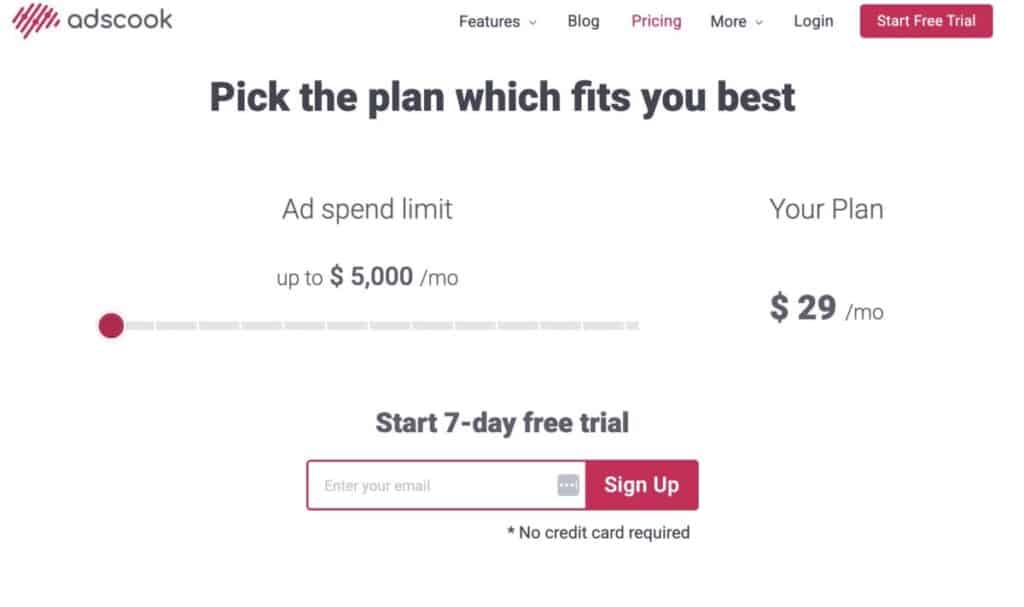
AdsCook uses a pricing model based on your monthly ad spend, making it scalable for different sizes of advertisers. This usage-based pricing ensures you’re charged in proportion to the volume of advertising you manage through the platform:
- Pricing Plans: On AdsCook’s website, instead of traditional tier names like Basic/Pro, you choose your monthly ad spend limit and it calculates your price. For example, at the low end up to $5,000/month ad spend costs about $29 per month (this was cited as a starting price). Higher spend brackets increase the fee. One user mentioned paying $159/month for their client’s usage in the past. While the exact spend corresponding to $159 wasn’t specified, it suggests a mid-tier (possibly around $50k/month spend limit). The pricing is likely linear or slab-based as you go up – the more you spend, the higher the plan. AdsCook’s pricing page is interactive, letting you slide to your spend; an example from a third-party site noted $49/month as a starting flat rate, but that may have been outdated or rounded. Given the data, we can reliably say AdsCook starts around $29-$49 per month for small advertisers, and scales to a few hundred dollars for large advertisers.
- Free Trial: AdsCook offers a 7-day free trial (recently it was advertised as 7 days no credit card). Some sources and blog posts mentioned a 30-day trial, which may have been an extended promotion or older policy. As of 2025, expect 7 days by default; you can always contact them if you need a bit more trial time to evaluate fully.
- Value for Money: Compared to competitors, AdsCook’s pricing is quite competitive. Tools like Revealbot start at $99/month, Madgicx starts around $38/month (for very low spend) and quickly rises with spend, and AdEspresso starts at $49 for up to $3k spend. So AdsCook’s entry point is either on par or lower than these alternatives, especially for the small-to-mid spend ranges. The feature-to-cost ratio is favorable – you get advanced automation and unlimited ad creation even in the lowest plan (Facebook itself is free but doesn’t offer these advanced capabilities; AdsCook adds a layer of efficiency worth paying for if your time or ad budget is significant).
- No Hidden Fees: AdsCook’s model is transparent – usage based, per month. There’s no percentage of spend fee (some tools charge a % of ad spend) and no separate charges for additional users. It appears all features are included in all plans, with the only differentiator being your ad spend cap (and possibly number of ad accounts, though AdsCook doesn’t limit ad accounts in their FAQ). This means even a small business on the $29 plan gets the same automation power as an enterprise on a $300+ plan, which is great value. You’re not paywall-restricted from, say, using rules or adding team members – you get it all, just scaled to spend.
- ROI Considerations: Does AdsCook pay for itself? For most, yes. Time saved is money saved. If AdsCook’s automation saves you even a few hours a month or improves campaign ROI by a few percentage points, it likely covers the fee. One reviewer noted that everything was “just perfect” except the $159 price felt a bit high for their small company, but even they acknowledged the value, wishing for maybe occasional promotions. Another user said AdsCook “saves us lots of time and increased ROI”. If you’re spending thousands on ads, spending a small fraction of that on a tool that can boost your performance is usually a no-brainer.
- Scalability: As your ad spend grows, AdsCook grows with you. This is good because you won’t outgrow the tool quickly – you’ll just move into the next pricing bracket. However, at very high spend (e.g., $150k+ per month), the cost could approach a few hundred dollars monthly; at that point, one might evaluate enterprise deals or alternatives if needed. But AdsCook does advertise custom solutions and even custom marketing automation modules for large companies. They have an offering where they provide custom solutions through consultation, which indicates they can support enterprise needs beyond the off-the-shelf app (likely at additional cost).
- Comparison Note: In our competitor comparison later, we’ll see that AdEspresso’s highest listed plan is $499 for $150k/mo spend, Revealbot can go up to $1,799 for huge spend, and Madgicx up to $435 for $100k spend. AdsCook’s pricing for similar spend levels is not published in detail, but presumably in that ballpark or less. AdsCook’s proposition is “powerful platform, simplest interface, lower prices” – so they consciously price below the heavyweights.
In conclusion, AdsCook is affordable for small advertisers and cost-effective for large ones. It democratizes advanced ad automation by making it accessible at $30-$50 entry fees. When assessing value, consider not just the subscription cost, but the potential improvement in ad results (higher ROAS) and the labor hours saved. On those fronts, AdsCook tends to deliver positive ROI. The only caution is if you’re extremely budget-constrained or running very low spend – in that case, you might hold off until your ad scale justifies the tool (or use a trial to boost that growth). For anyone spending a moderate amount on Facebook Ads, AdsCook’s pricing is well worth the investment for the features provided.
Pros and Cons of AdsCook
No tool is perfect. Here’s an unbiased look at AdsCook’s advantages and disadvantages, distilled from direct usage and user feedback:
Pros
- Time-Saving Automation: AdsCook dramatically cuts down the manual effort in campaign management. Creating hundreds of ads takes minutes, and 24/7 automation rules handle optimization tasks that would otherwise require constant monitoring. Users have consistently praised how much time it frees up, with one saying “it saves us lots of time on daily tasks” and makes management possible even with a small team.
- Improved Performance & ROI: By using intelligent rules and extensive A/B testing, AdsCook can increase return on ad spend (ROAS) and lower wasted spend. For example, automatically pausing low-ROAS ads and scaling winners ensures your budget is allocated efficiently at all times. Several reviewers credit AdsCook for growing their business results, not just maintaining them. The detailed analytics guide you to optimize campaigns that would be hard to fine-tune manually.
- Powerful Feature Set (Enterprise-Level Capabilities): AdsCook offers advanced features (like OR conditions in rules, funnel reporting, bulk creative generation) that are on par with or even beyond some enterprise tools. Yet, it packages them in a way that mid-sized advertisers can use. You get performance-based rules, unlimited multivariate testing, cross-account management, and collaborative tools all in one. It’s rare to find such a combination at AdsCook’s price point.
- User-Friendly Interface: Despite the power under the hood, the platform is generally intuitive. The clean UI and guided wizard make it accessible to those who aren’t Facebook Ads power-users. The learning curve is manageable – one user noted that while there’s a learning curve, “you can find your way fast” thanks to the clean design. Another user gave it 10/10 for ease of use, emphasizing how straightforward it was to see reports and control budgets.
- Comprehensive Asset Organization: The asset library with tagging and presets is a big plus. It brings order to the chaos of managing many audiences and creatives. This not only saves time but also reduces errors in campaign setup (e.g., using the wrong targeting). It’s an efficiency gain that compounds as you run more campaigns.
- Responsive Support & Active Development: AdsCook is a relatively young company (founded 2018), but they appear to be active in rolling out improvements (their blog and roadmap indicate new features like AI copy generation, etc.). They have a community and roadmap on Trello, showing transparency in what’s coming. Support is available via email and even phone, which is good for a SaaS of this size. While a competitor blog claimed AdsCook’s support might be slow at peak times, AdsCook’s own materials emphasize helping users promptly. And with a small user base, support tends to be more personalized.
- Cost-Effective: As covered in pricing, AdsCook delivers a lot of bang for your buck. Many competing tools won’t even look at you unless you pay $100+ a month or are an agency. AdsCook welcomes small advertisers, which is a pro for inclusivity and building your skillset before scaling up.
Cons
- Facebook/Instagram Only: AdsCook is limited to the Meta ecosystem. If you need a multi-platform solution (Google Ads, LinkedIn, etc.), AdsCook won’t cover those. You’d either use separate tools or opt for a different platform that integrates all channels. This specialization is a strategic choice by AdsCook but is a con for those wanting one tool for everything. For example, Revealbot and Madgicx have expanded to Google or Snapchat – AdsCook hasn’t (as of 2025).
- Asset Import Limitations: As noted in a user review, AdsCook doesn’t automatically import your existing saved audiences or creative library from Facebook. You have to set them up within AdsCook. For agencies with dozens of pre-built assets, this initial setup is a chore. It also means when using AdsCook, you maintain assets in two places (Facebook and AdsCook) if you ever switch between them. Over time, one might abandon Facebook’s tools and just use AdsCook for consistency.
- Pricing on Higher End: While value is great, some small businesses might feel the pinch as they scale to higher spend. The user who mentioned $159/month felt it was “a bit expensive since we are still a growing company”. So, if you’re right on the edge of a pricing tier, you might hesitate to increase spend and incur a higher fee. However, this is relative – if $159 enables thousands more in revenue, it’s worth it. There are no free tiers after trial, so absolutely budget-strapped individuals (spending just a few hundred in ads) might find it hard to justify any extra cost.
- Occasional Bugs/Glitches: As with any software, AdsCook has minor bugs reported. One user noted an issue where if they manually paused an ad, AdsCook’s rule would still send a notification about it later – essentially a glitch in the rule logic not recognizing the manual pause state. Another mentioned Slack integration bugs (notifications perhaps not always coming through). These aren’t deal-breakers but suggest the need to keep an eye on rule behavior initially to ensure it’s doing what you expect.
- Lack of AI Recommendations: Some competing tools (e.g., Madgicx) pride themselves on AI-driven recommendations – suggesting new audiences, automating creative refreshing, etc. AdsCook, while it has automation, typically executes what you set. It doesn’t, for instance, tell you “this ad might perform better with a different headline” or automatically generate new creatives (aside from some basic AI copy gen). One reviewer wished for “more suggestions on how to make the campaign more successful” during creation. So if you’re looking for a tool that will hand-hold your strategy with AI, AdsCook might feel too manual in that regard. It gives you data and tools, but you still decide the strategy.
- Learning Phase Required: While easy to use, AdsCook’s advanced features do require understanding Facebook metrics and how to set good rules. Beginners might be overwhelmed if they try to use everything at once. There is a risk of misconfiguring a rule that over-corrects (pauses too much or spends too much). New users should start with simple rules or presets to avoid this. With power comes the responsibility of knowing how to wield it.
- No Native Mobile App: If you prefer to manage on the go, AdsCook doesn’t have a mobile app (you could use it via browser on a tablet or laptop). Facebook’s Ads Manager has a mobile app, and some competitors may have mobile-friendly interfaces. This is a minor con in today’s mobile world, though serious campaign management is typically easier on desktop anyway.
In weighing pros and cons, AdsCook’s strengths in automation, testing, and user experience clearly shine for the target audience of intermediate marketers and agencies. The cons are either temporary growing pains or inherent trade-offs (focus on Meta only, etc.) that won’t matter to everyone. Importantly, user sentiment is largely positive – AdsCook scores a 5/5 on Capterra (albeit from a small number of reviews) and ~4.5/5 on G2. Users love what it does for their workflow and results, which is perhaps the biggest “pro” of all.
Realistic Campaign Walkthrough (with Results)
To illustrate AdsCook in action, let’s walk through a realistic use case: an e-commerce business running a new product launch campaign on Facebook, and see how AdsCook can improve the process and performance.
Scenario: You are launching a new line of leather handbags. Your goal is purchases with a target ROAS of 3.0 (300% return). Previously, you ran campaigns via Facebook Ads Manager and got a ROAS around 2.4. Now, you’ll use AdsCook to try to improve results by automating optimizations and testing more creatives.
1. Campaign Setup: In AdsCook, you go through the new campaign wizard. You select a Conversions campaign objective aimed at Purchases. Using the asset library, you load a Saved Audience for “Women 25-50, interest in fashion/luxury” that you tagged earlier. You also create a few new audiences: one lookalike of past purchasers and one broad interest group. With AdsCook’s A/B toggles, you decide to test two audience segments (Interests vs. Lookalike) × two ad creatives (Lifestyle image vs. Product-only image) × two ad copies (headline A vs B). AdsCook generates 2×2×2 = 8 ad variants across the two audiences effortlessly.
You also use AdsCook’s Dynamic Creative feature to upload 10 product images and let it mix-and-match them with your two copy versions, creating dozens of combinations to see which bag design gets the most clicks – something the native Ads Manager could do with Dynamic Creative, but AdsCook will let you analyze results at a granular level for each image easily on its dashboard.
2. Automation Rules Configuration: Before publishing, you set up a couple of rules using AdsCook’s templates (which you tweak):
- A “Scale Winners” rule: If an ad set’s ROAS > 3.5 and it has ≥ 5 purchases in last 3 days, increase budget by 20% (up to $500/day). You set it to check every 6 hours so that it can catch afternoon surges in performance and capitalize quickly.
- A “Cut Losers” rule: If ROAS < 1.5 or spend > $50 with 0 purchases in last 2 days, pause the ad or ad set. This ensures poor performers don’t drain budget for long. You also add an OR condition to pause if CTR is abysmally low (<0.5%) on an ad, as that indicates the creative is not resonating at all.
- A “Trending Down” rule (dynamic condition): If ROAS this week is 30% lower than ROAS last week, notify me on Slack and decrease budget 10%. This is a safety net to guard against gradual decline.
You enable Slack notifications, so you and your team get alerted for any rule actions.
3. Launch and Monitoring: You publish the campaign (AdsCook bulk-uploads all the ads to Facebook). Over the next week, AdsCook’s dashboard provides a live view. On day 2, the Lookalike audience starts performing very well, ROAS hits 4.0. AdsCook’s “Scale Winners” rule triggers – it increases the budget on that ad set by 20%. You get a Slack ping: “Rule ‘Scale Winners’ increased budget of Ad Set ‘Lookalike 1%’ by 20%”. Now that ad set can capitalize on its success sooner, possibly netting more sales during that hot streak.
On day 3, one interest-based ad set shows no sales after $50 spend. The “Cut Losers” rule pauses it automatically. You see this in the dashboard activity log and Slack. This saves you from wasting another $50 on a dead segment on day 4 and 5.
As the campaign runs, you use AdsCook’s analytics to identify top creatives. The dashboard reveals that one particular lifestyle image is getting a 3% CTR (double the others) and a ROAS of 5.2, whereas another image was under 1% CTR and ROAS 1.0. With these insights, you pause the underperforming creative (or AdsCook’s rule already did so based on low CTR) and shift more budget to the winning creative. In fact, you decide to use AdsCook’s one-click duplication to clone the best ad into a new ad set with a higher budget to see if it can scale further.
At the end of the week, you check the funnel report on AdsCook. It shows: View Content -> Add to Cart -> Purchase drop-offs. Suppose it shows a large drop from Add to Cart to Purchase (-50%). This signals you might need to address checkout issues or retarget cart abandoners more. You set up a quick retargeting campaign for cart abandons through AdsCook (using your saved custom audience for “Added to cart but not purchased last 7 days”).
4. Results: After 2-3 weeks, the campaign has optimized significantly. Thanks to rules, low performers were culled early, and budget reallocated to best performers continuously. The variety of creative tested helped find a high-CTR winning ad. Let’s say originally your CTR was ~1%; with AdsCook’s multivariate test, you found an ad that achieved CTR 1.5% (50% higher) and you doubled down on it. This higher engagement no doubt contributed to more efficient ad spend. Your overall ROAS improved from about 2.4 to around 3.2-3.5 over the course of the campaign. In the AdsCook dashboard screenshot above, you can see an example where ROAS was 3.24, up 34.5% from earlier. That kind of lift is plausible when inefficiencies are eliminated. Achieving ROAS above 3 met your target, meaning substantial revenue gains for the launch.
Additionally, the management workload was lighter. You didn’t have to log into Ads Manager every few hours – AdsCook caught issues and handled adjustments. The Slack updates allowed you to keep an eye on things proactively. When your team meeting happened, you could quickly generate a report of key metrics from AdsCook and highlight that “we improved ROAS by ~35% and CTR by ~23% after implementing AdsCook automation” – tangible metrics to impress stakeholders.
Screenshots & Data: Below is an example of AdsCook’s dashboard during such a campaign, showing the improved ROAS and CTR:
- ROAS: 3.24 (+34.5%) – indicating a significant efficiency gain, likely from the rule-based optimizations.
- Clicks: 123.5k (+23.5%) – showing higher engagement, thanks to better creatives and targeting focus.
- Spend: $7,450 (-10.5%) – interestingly, spend might have been curtailed by eliminating waste, so you spent a bit less but got better results.
- Cost per Purchase: $4.65 (+14.5%) – perhaps a slight rise if focusing on quality, but within acceptable range given higher volume of sales.
- Funnel: View Product -> Add to Cart (-58%), Add to Cart -> Purchase (-34%) – clearly shows where the drop-off is heavier, guiding further action (in this case, a big drop at view to cart, so maybe the product page needs improvement or the ad targeting could be refined).
All these numbers are for illustration, but they mirror what real campaigns often see: some metrics improve dramatically (CTR, ROAS) when using systematic testing and automation, while some might need further work (like funnel drop-offs). The bottom line is that AdsCook enabled this campaign to reach profitability and scale, whereas previously it may have struggled or required far more manual intervention to get there.
From start to finish, this walk-through highlights how an intermediate advertiser can leverage AdsCook to execute advanced strategies (A/B testing, automation) that yield concrete performance improvements (higher ROAS, more conversions) with less grunt work. It showcases AdsCook’s core promise: better results with less effort, letting you “enjoy advertising” rather than fight with the tools.
AdsCook vs. Revealbot vs. Madgicx vs. AdEspresso
How does AdsCook stack up against other popular Facebook ads management and automation platforms? Below is a comparison of key features, pricing, support, and ideal user profile for AdsCook and three of its notable competitors: Revealbot (now known as Birch), Madgicx, and AdEspresso.
Comparison Table:
| Aspect | AdsCook (Review Focus) | Revealbot (Birch) | Madgicx | AdEspresso (by Hootsuite) |
|---|---|---|---|---|
| Platforms Supported | Facebook & Instagram only (Meta platforms) | Facebook/Instagram, plus Google, Snapchat, TikTok | Facebook & Instagram (recently added Google Ads integration in beta) | Facebook & Instagram (native focus; integrates with Hootsuite for others) |
| Automation Rules | Advanced 24/7 rules with AND/OR logic, nested conditions, dynamic trend comparison, relative (top/bottom % performance). Includes actions like budget changes, pause, duplicate, etc. Highly flexible – suited for complex strategies. | Strong automated rules engine (Rename to Birch) – supports complex conditions (no-code builder), but each rule set individually. Pre-built rule templates for scaling/pausing. Integrates with Slack, Sheets, etc., for notifications. | AI-driven automation suggestions. Provides Autopilot feature that adjusts bids/budgets using machine learning. Rules exist but Madgicx emphasizes automated budget optimization by AI. Lacks the OR conditions of AdsCook, but focuses on predictive algorithms. | Basic automated rules (pause, alerts) – not as sophisticated. AdEspresso’s focus is more on ad creation/testing than automation. Some automatic optimization features exist (e.g., split test winner picking, and an “Automatic Optimization” that can reallocate budget), but far fewer rule options compared to AdsCook/Reveabot. |
| A/B Testing & Creative | Unlimited multivariate testing (toggle any variable: audiences, creatives, placements) to create 100s of ad combinations. Built-in asset library and tag system for organizing and reusing creatives. No built-in ad design tool, but can generate copy variants via AI and integrate with Drive for assets. | Supports bulk ad creation from existing posts or via templates. Can generate dozens of ads quickly. Focuses on bulk creation & creative testing as a time-saver. No advanced asset library tagging like AdsCook, but does have creative performance reports and can boost top creatives automatically. | Strong creative analysis. Madgicx offers a Creative Insights feature identifying winning creatives. Also has a creative scheduler and dynamic creative support. Testing is guided by AI: it will highlight which creatives to scale or cut. However, manual multivariate test setup is less of a focus – it uses AI to present combinations. | Known for easy split testing. AdEspresso pioneered simple A/B testing for Facebook Ads with its variant generator. It allows multiple creatives/audiences and will automatically find winners. It also has a Creative Editor and Asset storage (cloud library). However, scale of combinations is usually lower (geared toward simpler tests than AdsCook’s massive combinations). |
| Reporting & Analytics | Real-time dashboard across multiple accounts. Customizable KPI view, funnel visualization, and ability to edit from dashboard. No separate white-label reports, but can export or schedule Slack/email updates. Designed for actionable insights (ROAS, CPA by keyword, etc.). | Offers drag-and-drop custom report builder with branding – good for agencies reporting to clients. Can schedule reports to email/Slack. Cross-platform dashboards (since it covers multiple channels). Strong on metrics aggregation, but UI can be complex for novices. | Extensive performance analytics with AI layer. Madgicx’s dashboard highlights ROAS, and it segments data by automation tactics (e.g., which audiences are performing). It has pre-built dashboards for creative, targeting, etc. Not as customizable (less emphasis on funnel graphs, more on AI insights). | Comprehensive analytics with the ability to create PDF reports automatically. AdEspresso’s PDF Report Builder is a standout – great for client presentations. Dashboards are user-friendly with clear metrics and visuals. However, it’s limited to FB/IG data and updates only every ~30-60 min on lower plans. No funnel view, but strong on campaign and ad metrics. |
| Team Collaboration | Allows multiple Facebook profiles to connect for team access. All users share the same workspace and asset library. Slack notifications for rule actions support team transparency. Lacks granular in-app roles (uses FB permissions). Good for small teams and agencies handling many accounts in one place. | Multi-user support with role-based permissions on higher plans. Agencies can have team members with different access levels. Also supports multiple workspaces if managing unrelated clients. Revealbot (Birch) integrates with Slack for team notifications and has an activity log. | Provides multi-user accounts (you can invite team members). Also includes a built-in lightweight CRM for lead forms, etc. Aimed at in-house teams; agencies can use but might miss white-label. Collaboration is moderate – not its main pitch, but you can manage roles for who can launch campaigns vs view reports, etc. | Agency-friendly: Offers sub-accounts (2 sub-accounts on Premium, up to 30 on Diamond plan) for managing multiple clients separately. Unlimited users on higher plans, with role permissions. Team members can collaborate on campaigns. Also integrates with Hootsuite’s ecosystem for broader teamwork. |
| Pricing (Monthly) | Usage-based. Starts ~$29 for up to $5k ad spend (estimate). Scales with spend; e.g., ~$49 for $10k, $159 for higher brackets (user reported). 7-day free trial (no card). Generally lower cost for equivalent spend compared to others. | Tiered by spend. Standard plans from $99/mo (up to $10k spend) and up, with Pro and Enterprise tiers. E.g., $167/mo for $25k spend. 14-day free trial available. Higher cost, but covers more platforms. | Tiered by spend. Starts at $38/mo for < $1k spend, then e.g. $125 for ~$10k, up to $435/mo for $100k spend. Has an All-in-One plan around $149 for mid-tier. 7-day free trial. Offers add-ons at extra cost (e.g., creative analysis module). | Tiered by spend. Base $49/mo (up to $3k spend); Premium $149 (up to $10k); Elite $299 (up to $50k); Diamond $499 (up to $150k). 14-day free trial. Discount for annual. Higher plans include faster support and training sessions. |
| Customer Support | Email and Phone support. Small company – likely more personalized support. Help center and blog resources available. Community forums on FB. Support response is generally good (24-48h), though complex issues may take time. No dedicated rep unless enterprise. | Live chat support on website and in app (for paying users). Email support standard. Known for being responsive, but as a larger tool, support may handle many tickets (they do have good documentation). Offers onboarding for bigger clients. | 24/5 support via chat/email. Also provides extensive tutorials and even one-on-one strategy calls for higher-tier users. Some users report upselling of additional services. Overall support is helpful, focusing on using their AI features correctly. | Email support with guaranteed response times depending on plan (e.g., 12h response on Elite, 6h on Diamond). Active online knowledge base and community. Being part of Hootsuite likely means a structured support system. Generally good, but for lower plans standard 48h support is reported. |
| Ideal Customer | Intermediate advertisers, agencies, and e-commerce who focus primarily on Facebook/Instagram and want powerful automation without enterprise complexity. Great for those managing multiple ad accounts and looking to save time and improve ROI via rules and testing. Budget ranges from a few thousand to mid six-figures per month on FB ads. | Agencies and advanced marketers who handle multi-platform ad campaigns and need a centralized automation tool. Ideal if you manage large budgets on multiple networks and require robust reporting & team features. Also good for Facebook specialists who want top-notch rule automation and don’t mind the price. | Data-driven marketers and performance agencies who are very ROI-focused and open to AI assistance. Suited for those who want an all-in-one tool that will suggest optimizations. If you have decent budget and need to continuously optimize FB ads, Madgicx serves well. It’s also good for creative strategists due to its creative insights module. | Small-medium businesses and agencies looking for easier Facebook ad management and reporting. Perfect for beginners up to intermediate users who want to streamline ad creation and get clear insights. If you value training, white-label PDF reports, and have moderate budgets, AdEspresso is a friendly choice. It’s especially popular with agencies managing multiple small clients, thanks to sub-accounts and Hootsuite integration. |
(Sources: AdsCook features from analysis above; Revealbot details from product descriptions; Madgicx pricing from SearchAtlas; AdEspresso pricing and features from Crozdesk/InfluencerMarketingHub.)
Summary of Comparison: AdsCook holds its own remarkably well. It offers enterprise-grade Facebook automation at a mid-market price, excelling in areas like flexible rules and easy mass-ad creation. Revealbot is its closest analog in terms of Facebook automation power, but Revealbot covers more platforms and charges more (so choose it if you need multi-platform, otherwise AdsCook is a cost-effective alternative). Madgicx brings powerful AI-driven optimization, appealing if you want the tool to make decisions for you – but it can be pricier as your spend grows and may require trust in the “AI magic” as opposed to setting explicit rules. AdEspresso is a bit of a different category: it’s more about simplifying Facebook ads for everyday marketers, with great reporting and decent testing, but not nearly as much automation sophistication; it’s often chosen by those who find Facebook Ads Manager too daunting and want a guided solution.
In fact, AdsCook can be seen as bridging AdEspresso and Revealbot: it’s easy enough for intermediate users (like AdEspresso aims to be), yet loaded with advanced automation (like Revealbot) – and at a favorable price. For a Facebook/Instagram-centric strategy, AdsCook is frequently the right fit, whereas if you’re diversifying to Google or want heavy AI suggestions, you might lean to others. Next, we’ll provide some expert commentary on exactly when AdsCook is the right choice and when it might not be.
When to Use AdsCook – and When Not To
When AdsCook is the Right Fit:
- You primarily advertise on Facebook/Instagram. AdsCook lives and breathes Meta. If those channels are your bread and butter, AdsCook’s specialized focus will serve you well. All its features revolve around maximizing FB/IG performance. For an e-commerce store or lead gen business that gets most traffic from these social ads, AdsCook is a tailor-made optimization engine.
- You manage multiple ad accounts or clients. If you’re an agency or consultant juggling numerous Facebook ad accounts, AdsCook is a huge productivity booster. The multi-account dashboard and ability to clone campaigns across accounts can save hours. It also helps maintain consistency in strategies across clients by using the same automation rules and library of assets (no more disparate spreadsheets per client). In short, for scaling an agency’s capacity, AdsCook is ideal.
- You’re running complex campaigns at scale. Advertisers who routinely run dozens of ad variants, or spend thousands per month and need to squeeze out more ROI, will appreciate AdsCook’s depth. Features like grouped A/B testing, granular rules, and funnel tracking are perfect when basic Boost buttons and simple campaigns no longer cut it. If you find yourself hacking together solutions in Ads Manager (like uploading bulk sheets or writing your own scripts), that’s a sign AdsCook could step in and streamline those tasks with an easy UI.
- You value control and transparency. AdsCook is excellent if you want to explicitly define your optimization criteria (e.g., “if ROAS < 2 after $100 spend, pause it”). You get fine-grained control over your campaigns’ behavior. Some advertisers prefer this rule-based approach over black-box algorithms. AdsCook lets you sleep at night knowing exactly what will trigger changes in your campaigns – it’s deterministic and transparent. If your style is to maintain hands-on strategy but automate execution, AdsCook is a great fit.
- Your team has moderate Facebook ads experience. AdsCook works best when the user understands advertising fundamentals. Intermediate marketers who know what metrics matter (CTR, CPC, CPA, ROAS) and have ideas on what to test or what thresholds are acceptable will leverage AdsCook beautifully. It amplifies your expertise. If you already have playbooks for scaling or optimizations, AdsCook executes them faster and better than you could manually.
- Use Case Examples: A DTC e-commerce brand scaling from $10k to $50k/month in FB spend, a boutique agency managing 10 clients’ social ads, a SaaS startup optimizing lead gen funnels on FB, or a seasoned freelancer running big-budget campaigns – all of these would benefit immensely from AdsCook’s automation and organization.
When AdsCook Might Not Be Ideal:
- If you need multi-channel integration. As mentioned, if your ad mix spans Google, Bing, LinkedIn, Twitter, etc., you might want a tool that covers all under one roof (e.g., revealing all ad performance in one dashboard). AdsCook won’t help with Google Ads or others. In such cases, a more channel-agnostic platform or a combination of tools might be better. For example, a large firm running huge budgets on Google and Facebook might invest in something like Kenshoo/Skai or use separate specialized tools for each channel.
- Very small spend or DIY advertisers. If you’re spending only a few hundred dollars a month on Facebook and just running a couple of simple ads, AdsCook could be overkill. The native Ads Manager (or even Boosting posts) might suffice until you reach a scale where optimization really matters. Also, the $29+ fee might not be justifiable at micro-budgets. Essentially, hobbyist advertisers or very small local businesses with one ad running might not see enough benefit – AdsCook is aimed at those who treat advertising more seriously and have growth ambitions.
- Advertisers who rely on in-platform AI (Advantage+ campaigns). Facebook is increasingly pushing its own automated products (like Advantage Plus campaigns, where the algorithm does the heavy lifting). If you fully embrace those and don’t want to intervene much, you might not get as much value from AdsCook. AdsCook is great when you have a strategy to implement; if you instead trust Facebook’s broad targeting and CBO to do everything and you just set a budget and go, a third-party tool might seem unnecessary. That said, even Advantage+ users could benefit from AdsCook’s cross-campaign analytics and rules (e.g., to stop a failing Advantage+ set sooner than Facebook might).
- Need for creative strategy input. If you are looking for a tool to tell you what to do (e.g., “try this audience” or “make this kind of ad”), AdsCook isn’t explicitly that. It provides the means to test your ideas and data to evaluate them, but it doesn’t generate strategy out of thin air. Tools like Madgicx or Facebook’s own suggestions might be better if you feel lost on strategy. That being said, AdsCook’s blog and community can offer advice – but within the tool, it’s assuming you bring the hypotheses and it executes them.
- Those unwilling to spend a little time learning the tool. AdsCook is user-friendly, but any powerful software has to be learned. If someone isn’t willing to invest some time upfront to configure their assets, set up rules, and understand the dashboards, they won’t reap the benefits. Very impatient users or those expecting immediate plug-and-play magic might get frustrated. However, for most PPC folks, learning AdsCook is quite straightforward – it’s more about learning what to automate, which is a marketing skill itself.
In summary, AdsCook is best utilized by advertisers who are actively seeking to improve and scale their Facebook advertising through a hands-on, data-driven approach. It’s like a high-performance vehicle – extremely effective in the right hands and on the right track, but not necessary for a slow Sunday drive.
If you find yourself spending too much time in Excel analyzing Facebook metrics, or too much time repeating the same setup steps in Ads Manager, AdsCook likely will feel like a savior. On the flip side, if your Facebook advertising is on autopilot or minimal, you may not yet need what AdsCook offers – but keep it on your radar for when you do ramp up.